9. Databricks Genie Agent for Unstructured Documentation: A 350-Question Evaluation
Can a Managed Genie Agent Match a Custom RAG System?
Comparing managed Genie Agent RAG with Local RAG and a fine-tuned Qwen 3.5 9B model across answer quality, grounding, latency, and engineering effort.
Most discussion of Databricks Genie focuses on questions over governed tables and business metrics. This project tests a different capability: using a Databricks Genie Agent to answer questions over unstructured documentation files stored in a Unity Catalog Volume.[1]
I used the same official Databricks documentation corpus that I had already used to build a Local RAG system and to fine-tune Qwen 3.5 models. That made it possible to compare the three answer paths on one held-out benchmark instead of treating a polished demo as proof.
Question. How does a managed Genie Agent answering from unstructured documentation compare with a custom Local RAG system and a fine-tuned local model when all three address the same questions?
Method. The systems used the same Databricks documentation through different preparation paths. For the Genie Agent, I converted 1,142 HTML pages to PDFs, stored them in a Unity Catalog Volume, and enabled Content Search. Local RAG indexed the documentation as text chunks; those chunks also supplied the Q&A used to fine-tune Qwen 3.5 9B. I then generated answers from the Genie Agent, Local RAG, the fine-tuned model, and its base model for the same frozen 350-question holdout. A Qwen 3.8 27B judge scored the saved answers; I measured latency and used 10,000 bootstrap resamples to estimate uncertainty in the mean scores.
Results. The Genie Agent and Local RAG both averaged about 4.9/5 for judged correctness and completeness. The fine-tuned 9B model improved on its base model but scored lower than either retrieval system; it answered in about 1 second on average, versus 24.6 seconds for Genie and 39.7 seconds for Local RAG. With the PDFs already prepared, Genie Agent setup and initial indexing took roughly 40 minutes. The billed rows for indexing and 350 answers totaled $39.78 under the user promotion.
Interpretation. On this documentation benchmark, the managed path reached similar judged answer quality to the custom RAG path with substantially less application infrastructure to build. These results describe the tested deployments; the observed cost is not a production price estimate.
1. Build a documentation Genie Agent
Before you start
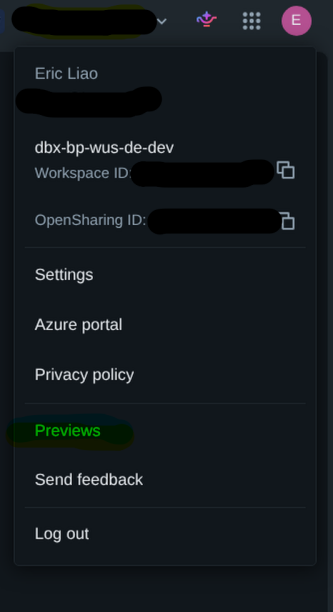
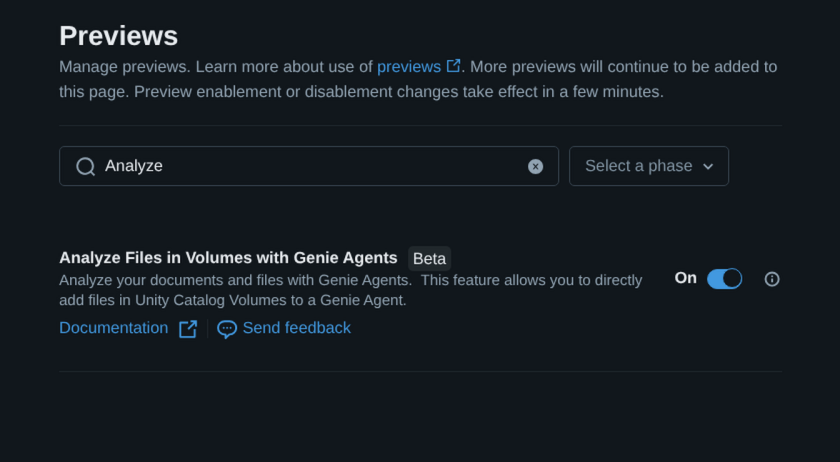
Analyze Files in Volumes with Genie Agents is currently Beta. A workspace administrator must enable it from the Previews page. Content Search also requires a supported region, Lakebase, ai_parse_document, and Foundation Model APIs.[1][2]
In my Databricks Free Edition workspace, I could not find a Previews menu, so I could not enable the feature there. If the menu is unavailable in your workspace, check which preview capabilities your workspace exposes before preparing the files.[3]
Step 1: Store the source files in a Unity Catalog Volume
In Catalog Explorer, choose a catalog and schema, then create or reuse a managed Volume. Upload the documents to that Volume. For this walkthrough, I converted 1,142 Databricks documentation HTML pages to PDFs for the Genie Agent. Local RAG used the documentation text, not these PDFs. Content Search works only with managed Volumes, not external Volumes.[2][4]
Step 2: Create the Genie Agent and attach the Volume
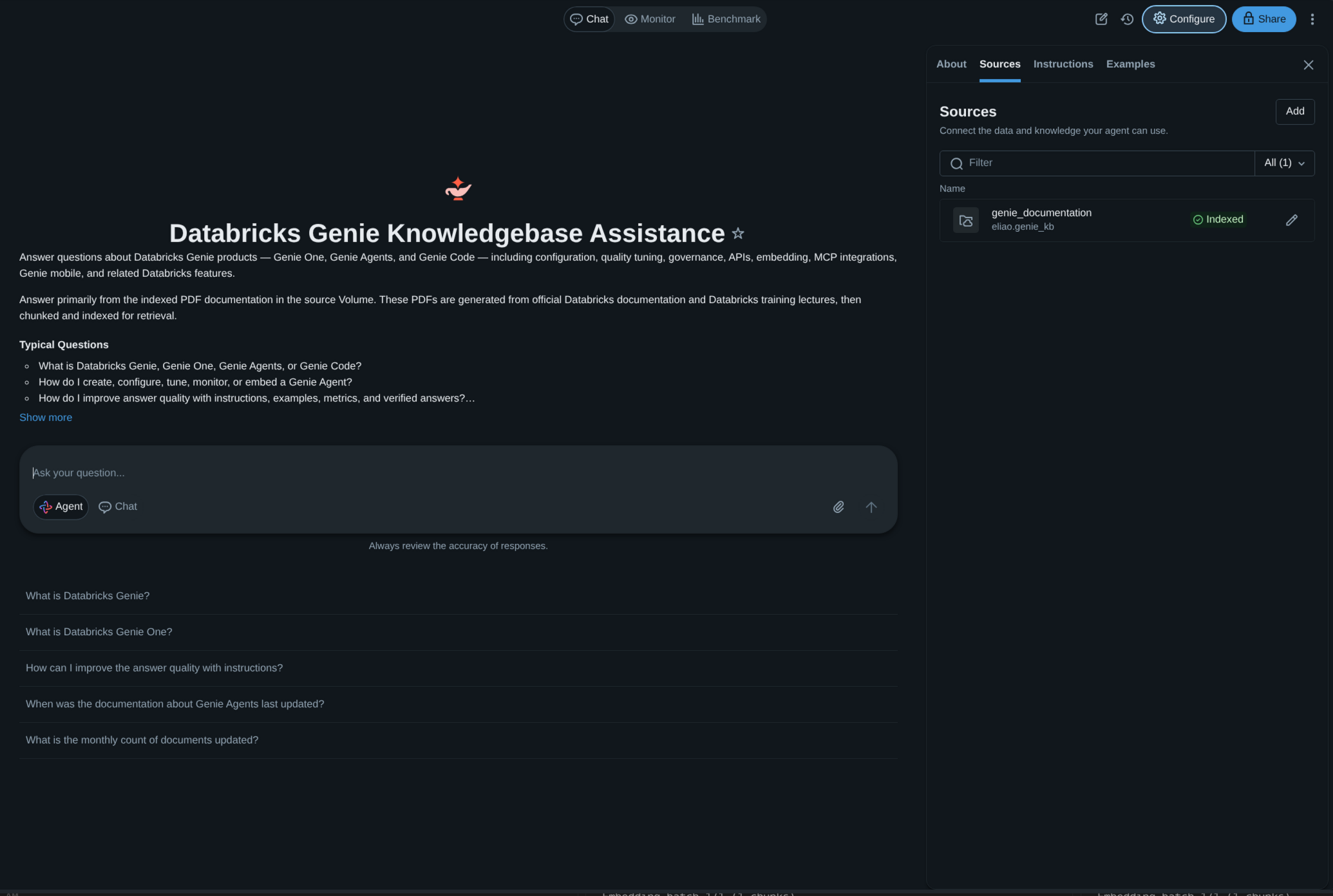
Open Genie Agents, select + New, and choose the Volume as a source. Add a useful source description, then create the Agent. Sources can later be added or edited from Configure > Sources.[1]
Step 3: Enable Content Search and wait for the first sync
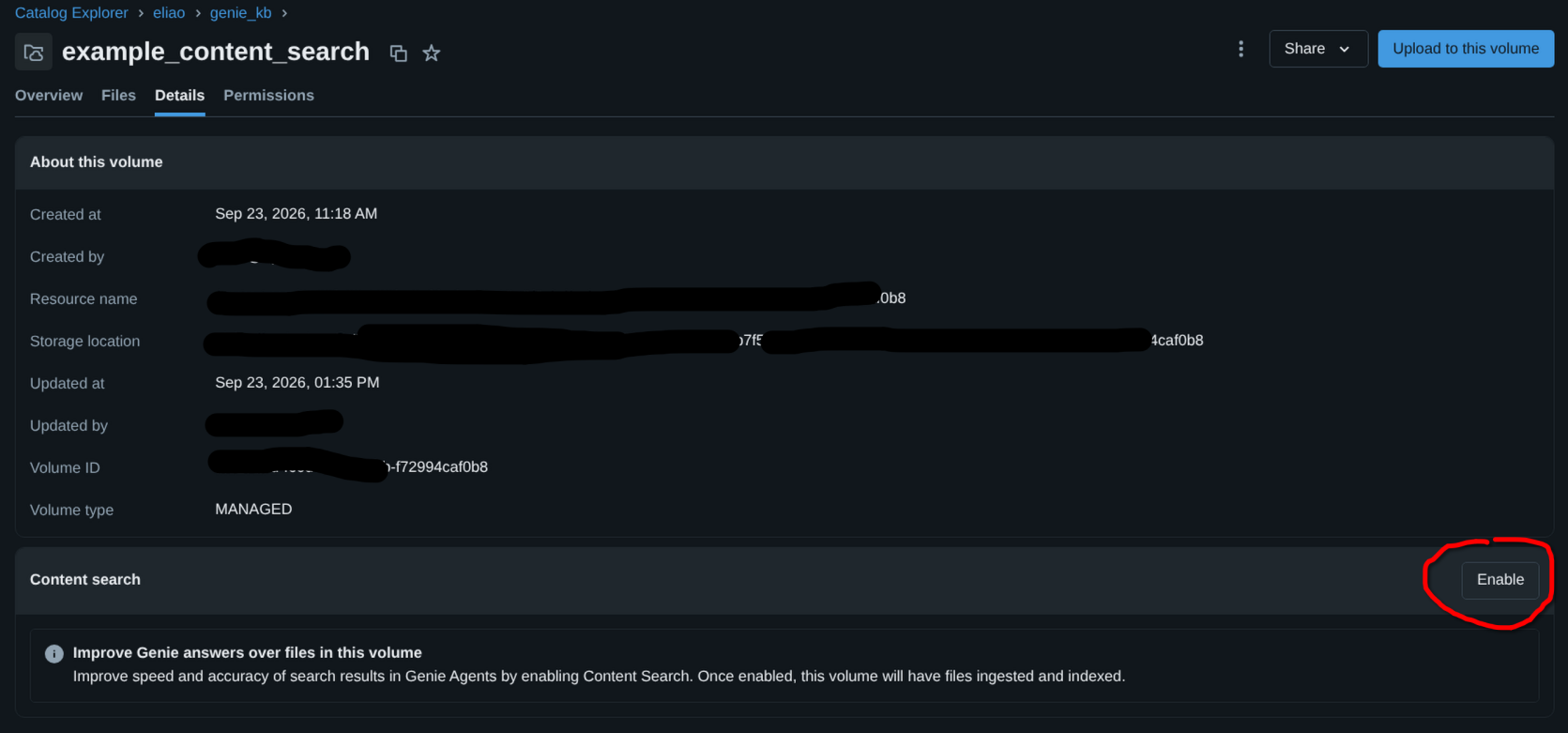
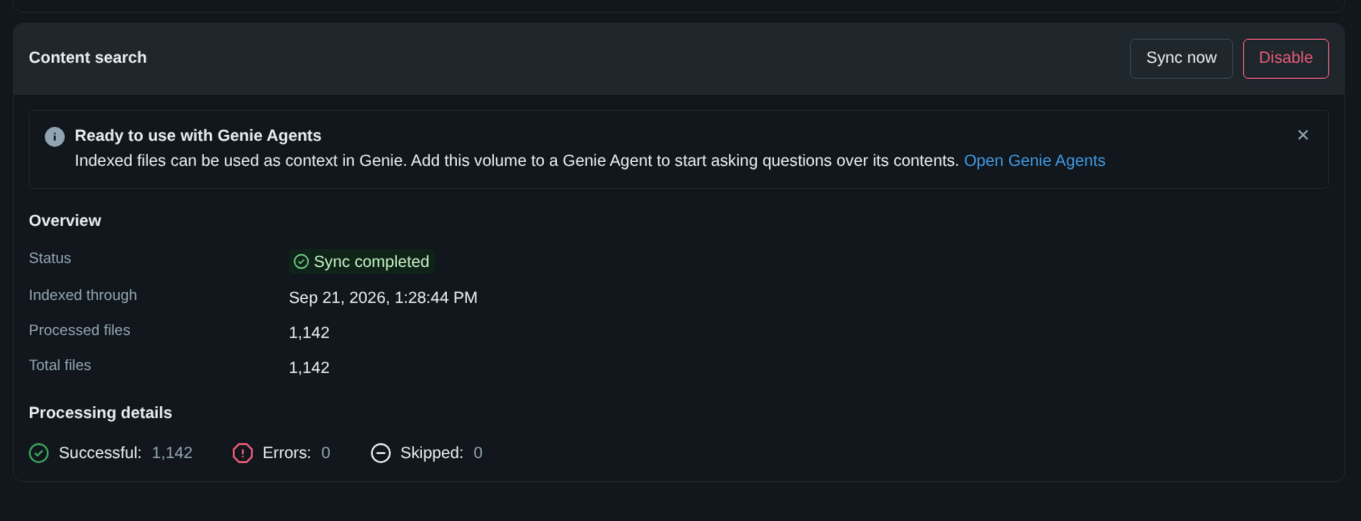
Open the attached Volume in Catalog Explorer, go to Details, and select Enable in the Content search section. Databricks parses supported files with the native ai_parse_document function and builds the search index.[2]
Content Search is optional, but it changes what the Agent can use. Without it, a Volume is limited to 500 files and an Agent can retrieve up to five files for a question. With Content Search, an indexed Volume can contain up to 10,000 supported files and the Agent can retrieve passages across them. Files larger than 50 MB and unsupported formats are skipped.[1][2]
Step 4: Ask questions in Agent mode
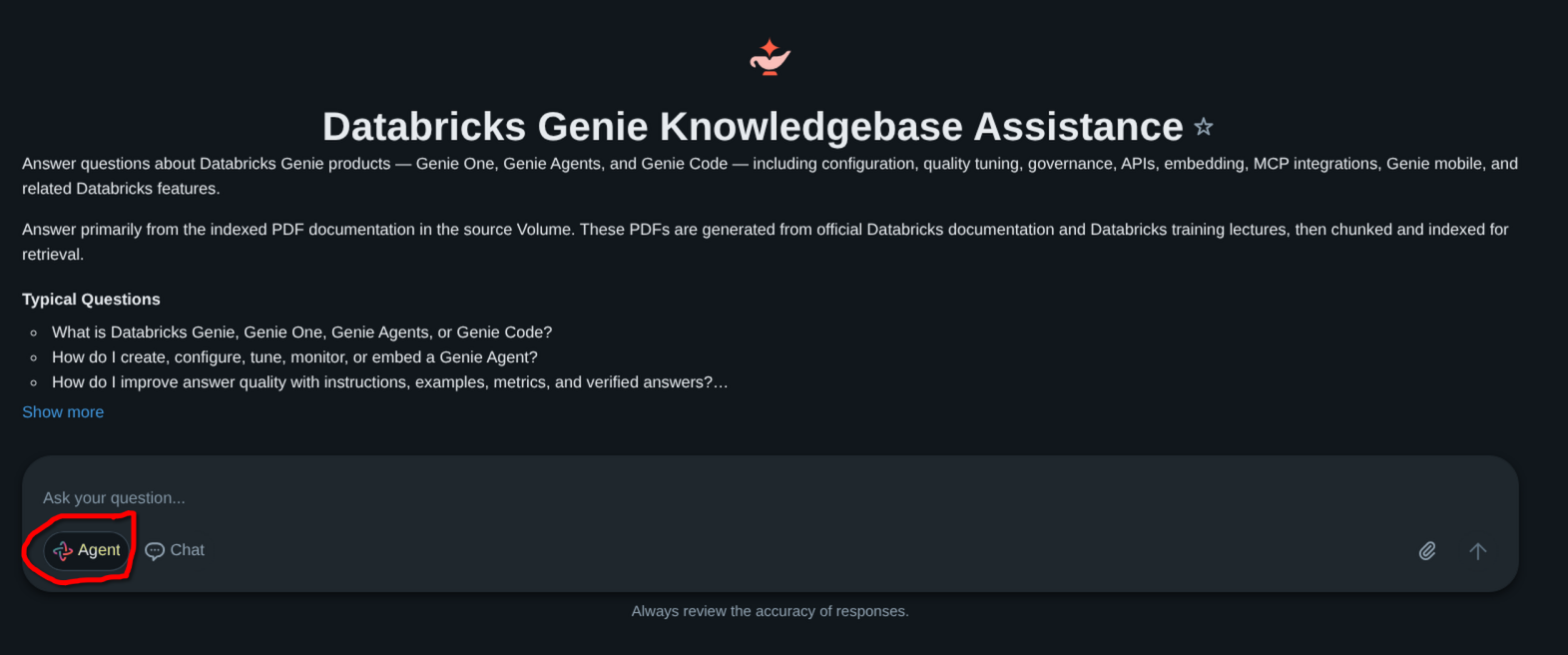
Return to the Genie Agent, turn on Agent mode, and ask questions about the attached files. File analysis is available only in Agent mode. Users who ask questions also need READ VOLUME permission on the Volume.[1]
Step 5: Refresh the index when the files change
New and edited files are not indexed automatically. Return to the Volume's Content search section and select Sync now after source changes. Databricks handles parsing and indexing during the sync; your ingestion process is responsible for getting the right documents into the Volume.[2]
The simple part of this workflow is important: I attached a governed data source to an Agent, enabled indexing, and started testing questions. I did not separately assemble a document parser, chunker, embedding service, vector index, retrieval pipeline, agent loop, and answer-serving model.
2. Evaluate the Genie Agent on the same benchmark
Evaluation design
The evaluation uses 350 held-out questions about official Databricks documentation. Each question rephrases knowledge represented in the documentation and has a reference answer. These questions were not used for checkpoint selection, so the benchmark tests new wording rather than knowledge absent from the source material. The fine-tuning project page explains how the Q&A pairs and holdout were constructed.
I asked four systems the same questions: the Qwen 3.5 9B base model, its best fine-tuned checkpoint, the Databricks Genie Agent, and Local RAG. I saved every answer and its response time, including each system's own retrieval and reasoning steps, before scoring. The judge, unsloth/Qwen3.8-27B, rated correctness and completeness from 1 to 5 and counted factual claims it considered unsupported. It saw the question, reference answer, and candidate answer, but not the source documents. That count is therefore a judge assessment, not a document-level grounding check.
I used the same judge and rubric for all four systems. The 95% bootstrap intervals below show how their average scores vary when the 350 questions are resampled; they do not account for mistakes or bias in the judge. This is an LLM-judged comparison, not a human-rater study.
The implementation and evaluation code are in two repositories: Local RAG and fine-tuning and benchmarking.
One question, three answer paths
Aggregate scores are useful, but a single matched example makes the difference easier to see. The following question is benchmark index 55, based on Databricks' Databricks Apps deployment documentation.
databricks apps list-deployments my-appdatabricks apps list-deployments my-appThis command shows the deployment history for the app.
databricks apps list-deployments my-app. [S2]databricks apps get-deployment <app-name> --output tableThe example illustrates the trade-off behind the aggregate results. Both retrieval-based systems return the documented command. The fine-tuned model is much faster, but it confidently selects a plausible-sounding command that does not answer the question. To keep the comparison readable, the cards show representative excerpts; the judge scored each system's complete saved answer.
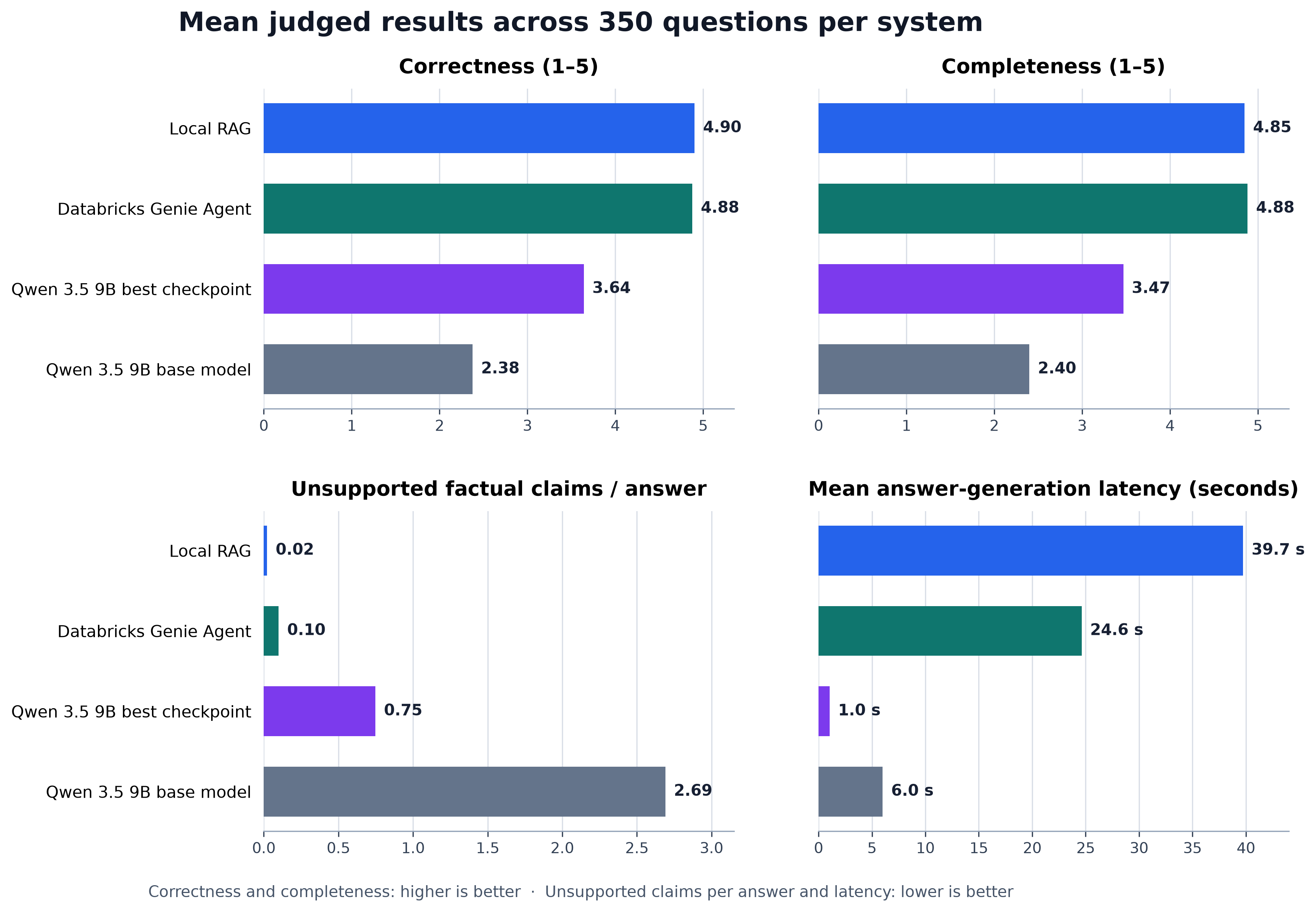
One question is only an illustration, not a general result. I scored all 350 saved answers with the same judge and rubric. Figure 6 summarizes the observed results across the full benchmark.
Key findings from Figure 6:
- Local RAG and the Genie Agent had similar, high judged quality. Both averaged about 4.9 out of 5 for correctness and completeness.
- Fine-tuning improved the 9B model. The best fine-tuned checkpoint averaged 3.64 for correctness and 3.47 for completeness, compared with 2.38 and 2.40 for the untuned base model.
- The judge flagged fewer unsupported claims in retrieval-based answers. It flagged an average of 0.02 claims per Local RAG answer, 0.10 per Genie Agent answer, 0.75 per fine-tuned answer, and 2.69 per base-model answer. These are assessments against reference answers, not claims checked against source documents.
- Direct fine-tuning was faster in this run. Mean response latency was 1.0 second for the best fine-tuned checkpoint, 24.6 seconds for Genie, and 39.7 seconds for Local RAG.
Figure 6 leaves one important comparison hard to see: how different were the Genie Agent and Local RAG on the same questions? Figure 7 subtracts Local RAG's result from Genie's for each question, then resamples those 350 question pairs 10,000 times to show a 95% interval for each average difference.
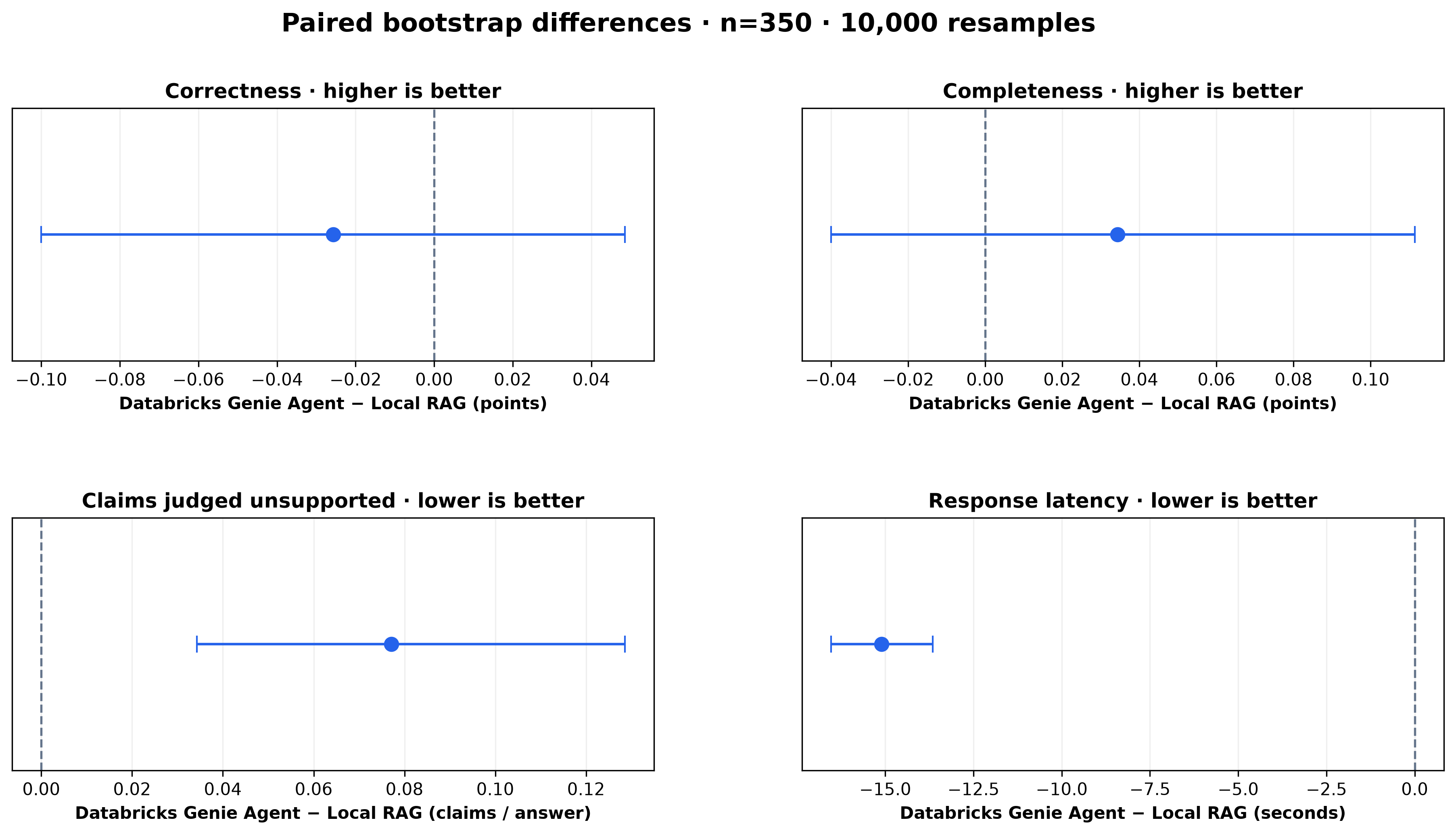
What Figure 7 adds: The judged correctness difference was −0.03 points (95% interval −0.10 to 0.05) and the completeness difference was +0.03 points (−0.04 to 0.11). Both intervals cross zero, so these small quality differences change direction across resampled questions. Genie averaged 15.1 seconds faster per answer (difference −15.1 seconds; interval −16.5 to −13.7). Its answers also had 0.08 more claims judged unsupported per question (interval 0.03 to 0.13). The latter is a difference in judge assessments, not a count of claims verified against the documentation.
Figure 7 shows little difference in judged answer quality between the two retrieval systems. A team choosing one would also need to consider what it takes to put that quality into service: setup time, ongoing maintenance, cost, and governance.
3. What the trade-offs look like in practice
Engineering effort
Genie Agent setup and initial Content Search indexing took roughly 40 minutes after I had collected 1,142 documentation HTML pages and converted them to PDFs. That estimate excludes collecting and converting the pages. Local RAG indexed the documentation text directly; its repository records work from August 25 to September 23, about four weeks of calendar time. I had prior experience with AI agents and RAG systems, so this is not a novice-versus-expert comparison.
All three still require source preparation and answer evaluation.
| Approach | What I built or configured | What I maintain |
|---|---|---|
| Genie Agent | Upload prepared files to a Volume, attach it to the Agent, configure access, and enable Content Search. | Sync changed files, manage permissions, monitor usage, and test answers. |
| Local RAG | Process and index documents; operate embeddings and an answer model; design retrieval, evidence selection, and citation checks. | Refresh the index, operate model servers, inspect failures, and improve the answer path. |
| Fine-tuned model | Generate and review training Q&A; train adapters; select checkpoints and evaluate direct answers. | Serve the model and repeat training and evaluation when data or requirements change. |
Local RAG used an AMD Radeon RX 7900 XTX (24 GB VRAM) for qwen3-embedding:4b retrieval and an NVIDIA RTX 5090 (32 GB VRAM) on another host to serve unsloth/Muse-Glimmer-30B-GGUF:UD-Q4_K_XL through llama.cpp for answer generation. Fine-tuning used the AMD GPU under ROCm. Across seven experiments, I estimate roughly 150 hours of training.
Observed Databricks usage cost
I calculated these amounts from system.billing.usage and system.billing.list_prices for the first sync of 1,142 PDFs and the 350-question Genie Agent run. This is an observed usage breakdown, not a general deployment price estimate.[5]
The first row covers initial indexing; the remaining rows cover the answer run.
| Work | What was billed | Calculated cost |
|---|---|---|
| Initial Content Search sync | Document parsing and search preparation | $13.15 |
| 350 answers | Content Search inference | $26.63 |
| 350 answers | Genie Agent orchestration and answers | $0.00 during the user promotion |
| Total for these rows | $39.78 |
Genie Agent orchestration is free for users through January 31, 2027, while service-principal usage is billed.[5] I used my own hardware for Local RAG and fine-tuning, without measuring electricity or equivalent cloud-hosting cost, so this is not a direct price comparison.
What Databricks adds around the Agent
The simplicity is not only the first setup. The managed path keeps several production concerns in the same environment:
- Unity Catalog: the documents are stored in a governed Volume, and access to the Agent's source files follows each questioner's
READ VOLUMEpermission.[1][2] - Content Search: Databricks handles document parsing, indexing, and serving the search index. I only manage the source documents and request a sync when they change.[2]
- Monitoring and accountability: the Genie Agent Monitor view provides questions, responses, and feedback; audit events and billing tables support usage review.[5][6][7]
- Unity AI Gateway: model and tool traffic can be governed with access controls, rate limits, budgets, and monitoring when those services are routed through the gateway.[8]
I still own document curation, access decisions, evaluation, and the business decision of whether an answer is useful. What I did not have to build was a separate parser, chunker, embedding service, vector index, retrieval pipeline, agent loop, and answer-serving infrastructure.
Which path should you start with?
These are not five interchangeable products. They are successive choices as requirements become more specialized.

A hybrid design is not a separate fifth starting point. It is what these paths can become when one assistant needs both fast direct answers and evidence-grounded answers from current documents.
For this benchmark, the Genie Agent gave me the most compelling managed starting point: strong grounded answers without building the Local RAG stack from scratch. The fine-tuned model remains useful as a fast direct-answer path, but it is not a substitute for retrieval when the answer must reflect current documentation and show its evidence.
References
[1][Analyze files in volumes with a Genie Agent](https://learn.microsoft.com/en-us/azure/databricks/genie-agents/volumes)
[2][Content search for Unity Catalog volumes](https://learn.microsoft.com/en-us/azure/databricks/volumes/content-search)
[3][Databricks Free Edition limitations](https://learn.microsoft.com/en-us/azure/databricks/getting-started/free-edition-limitations)
[4][Work with unstructured data in volumes](https://learn.microsoft.com/en-us/azure/databricks/volumes/unstructured-data-tutorial)
[5][Monitor and understand your Genie cost](https://learn.microsoft.com/en-us/azure/databricks/genie/monitor-cost)
[6][Monitor Genie Agent usage with audit logs and alerts](https://learn.microsoft.com/en-us/azure/databricks/genie-agents/audits-alerts)
[7][Test and monitor a Genie Agent](https://learn.microsoft.com/en-us/azure/databricks/genie-agents/monitor)
[8][Unity AI Gateway documentation](https://learn.microsoft.com/en-us/azure/databricks/ai-gateway/)
[9][Build agents on Azure Databricks](https://learn.microsoft.com/en-us/azure/databricks/agents/)